flowchart TB
%% Top-to-bottom, styled architecture
%% Client
subgraph Client["💻 Client Browser"]
direction TB
spa("⚛ React")
end
%% Cloud / Hosting (HuggingFace space)
subgraph HF["🤗 HuggingFace"]
subgraph Container["🐳 Docker Container"]
gunicorn("🦄 Gunicorn")
fastapi("⚡ FastAPI")
sqlite("💾 EHR (DB)")
int_tools("🛠️ Internal Tools & APIs")
agents("🤖 Agent Manager")
static("📁 Static Files")
end
end
%% External tools (outside HuggingFace, placed below)
subgraph External["🌐 External Tools"]
direction LR
llm("🧠 LLM Connection")
tools("🔗 External Tools & APIs")
langfuse("🔍 Langfuse / OpenTelemetry / MLFlow")
end
%% Connections (flow downwards; agents connect to external tools horizontally)
spa <-->|HTTPS| gunicorn
gunicorn <--> fastapi
fastapi --> static
fastapi <--> agents
agents <--> sqlite
agents <--> int_tools
int_tools <--> sqlite
agents<--> External
fastapi --> sqlite
%% Visual styling
classDef clientStyle fill:#0ea5a4,stroke:#064e3b,color:#fff,stroke-width:1px;
classDef containerStyle fill:#dbfdff,stroke:#19effa,color:#089299,stroke-width:2px;
classDef serviceStyle fill:#eff6ff,stroke:#1e40af,color:#001e3c,stroke-width:1px;
classDef HFStyle fill:#c8d113,stroke:#bec410,color:#001e3c,stroke-width:5px;
classDef externalStyle fill:#f1f5f9,stroke:#0f172a,color:#0f172a,stroke-width:1px;
class spa clientStyle;
class Container containerStyle;
class gunicorn,fastapi,static,agents,sqlite,int_tools serviceStyle;
class llm,langfuse,tools externalStyle;
style External stroke:#0f172a,stroke-width:1px,stroke-dasharray: 5 3
style Client stroke:#065f46,stroke-width:2px
class HF HFStyle
linkStyle default stroke:#94a3b8,stroke-width:1.2px
AI in Practice: The Clinical Dashboard
A Practical Guide to Using The Agentic Clinical Support Systems
LLM
ML
NLP
Chatbot
Hugging Face
Agent
Anthropic
Demo
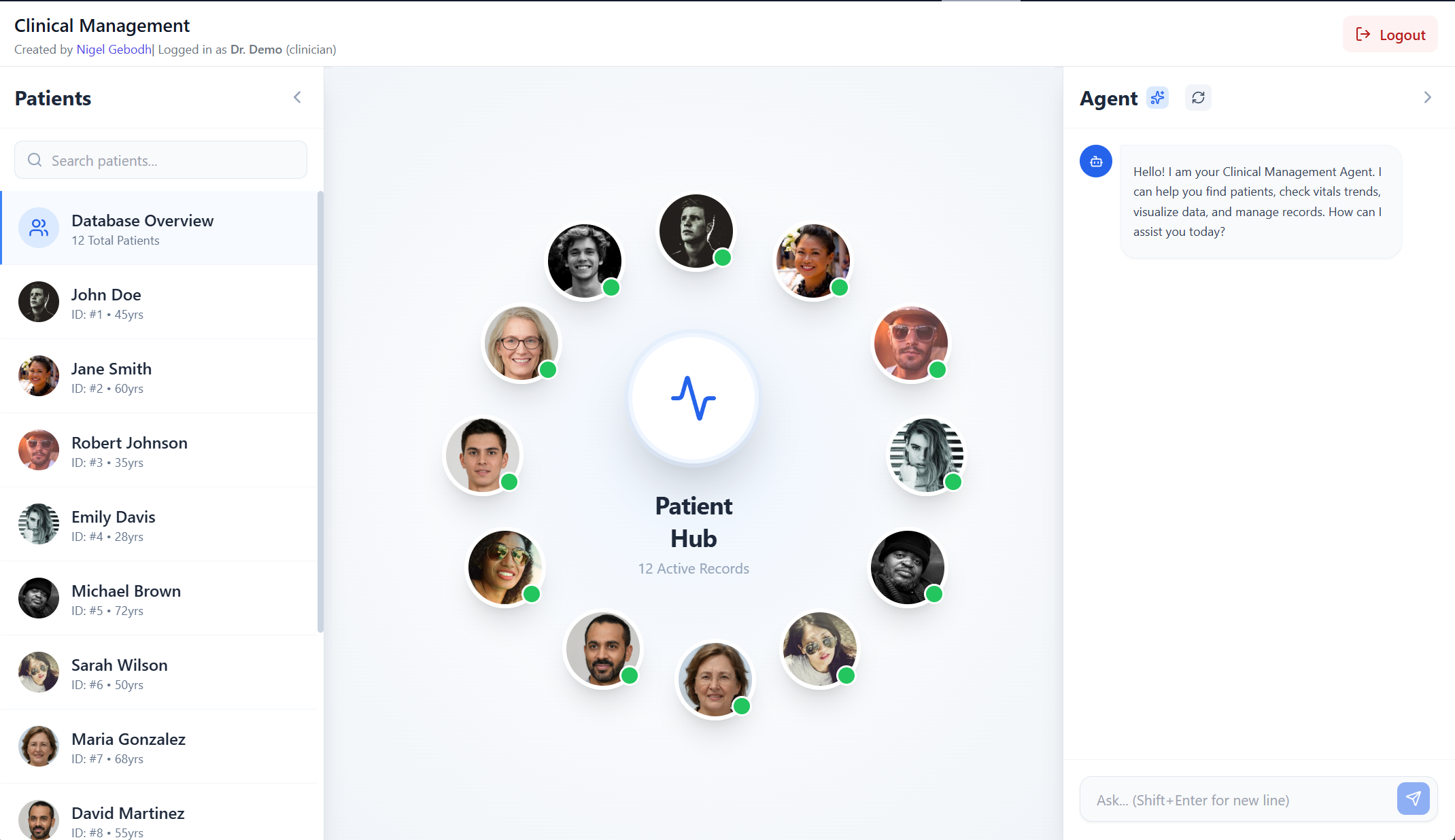
An intelligent clinical decision support system powered by AI agents for healthcare professionals and patients. See here
🚀 Tech Stack


What is a Clinical AI Agent Dashboard?
The Clinical AI Agent Dashboard is an AI-powered clinical management platform designed to streamline patient care through intelligent automation and natural language interaction. Built with clinicians and patients in mind, and combines the power of multi-agent AI systems with an intuitive interface to deliver clinical decision support, documentation assistance, and data management capabilities.
Why Do We Need AI Agents for Clinical Decision Support?
Unlike traditional monolithic AI systems, this dashboard employs a multi-agent architecture with specialized agent tools where specialized AI agents collaborate to handle complex healthcare workflows. This helps to quickly navigate and obtain pertinent information.
This approach offers:
- Natural language queries to retrieve and update patient data within a clinical database
- Intelligent agent routing that connects you to the right tool automatically via a coordinator agent
- Support for multiple leading AI models (OpenAI, Anthropic Claude, Google Gemini, Meta Llama, and more via LiteLLM)
- Extensible architecture allowing new clinical workflows to be added seamlessly
- Real-time streaming responses with progressive rendering for immediate feedback
Getting Started
Login & Authentication
- Navigate to the application in your web browser. See here
- Select which credentials you want to login as (log in info provided):
- Clinicians: Use your assigned email and password
- Patients: Log in with your patient portal credentials
- The system generates a token for your session and rebuilds/reloads on reset
Examples
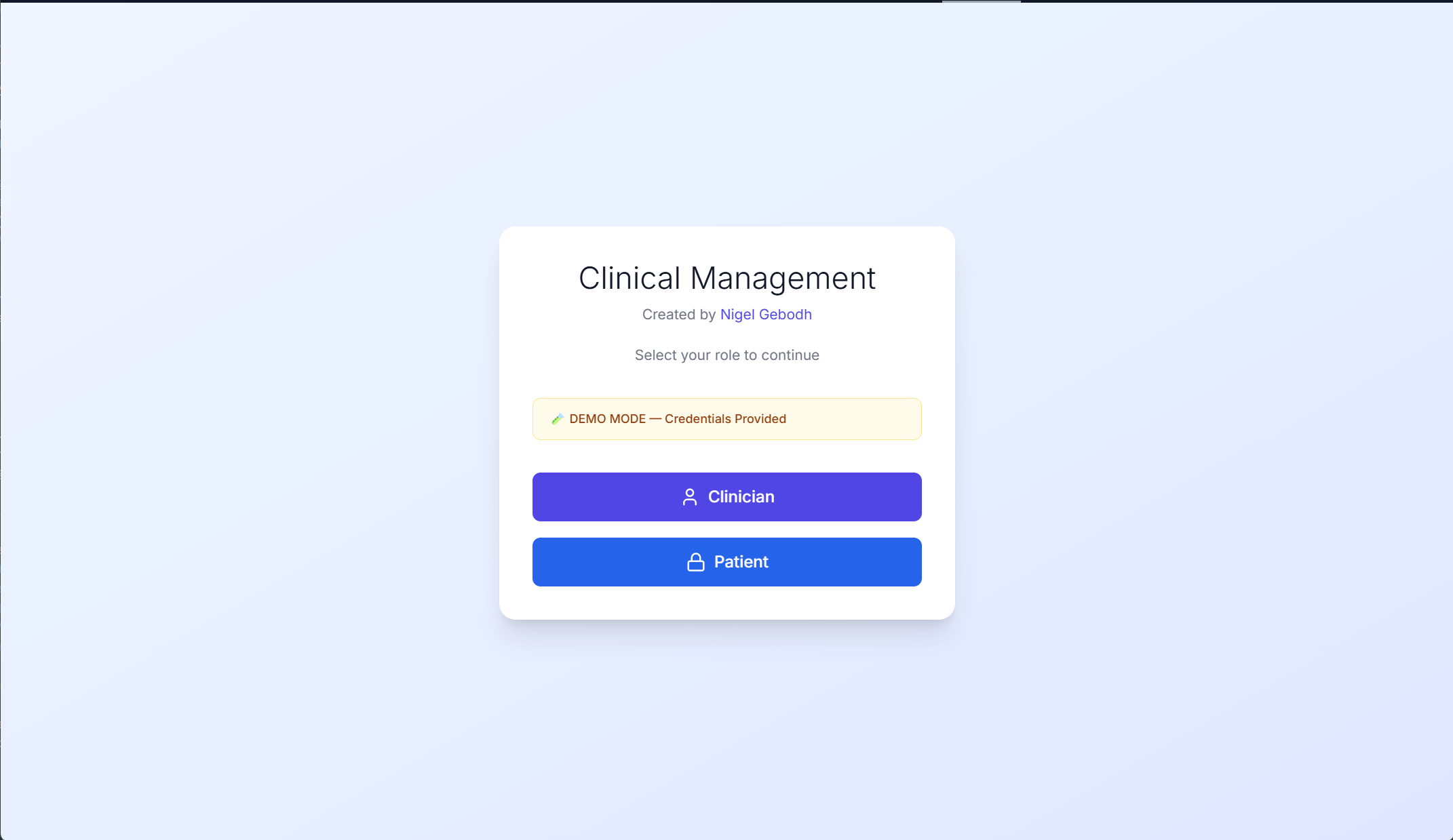
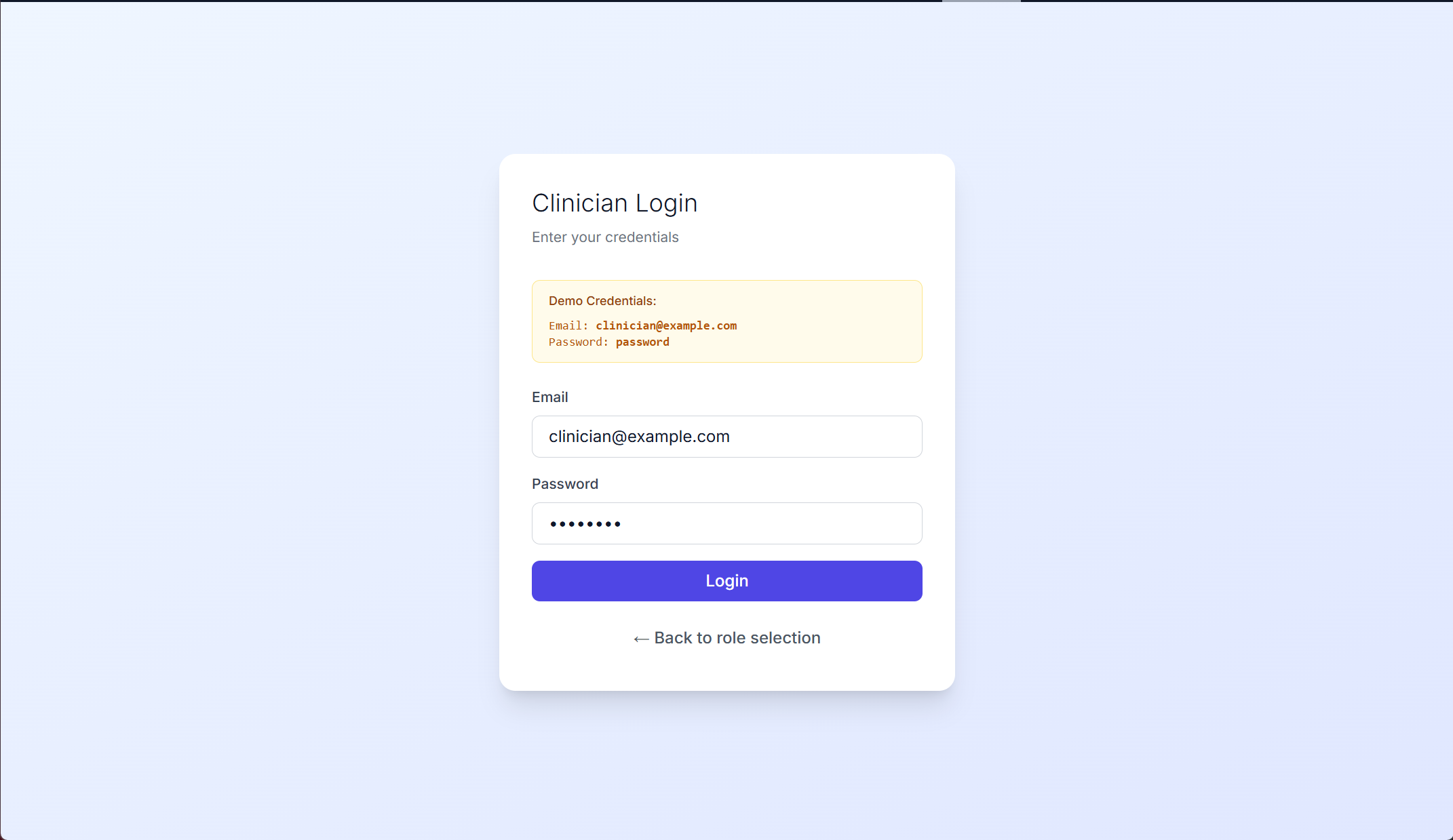
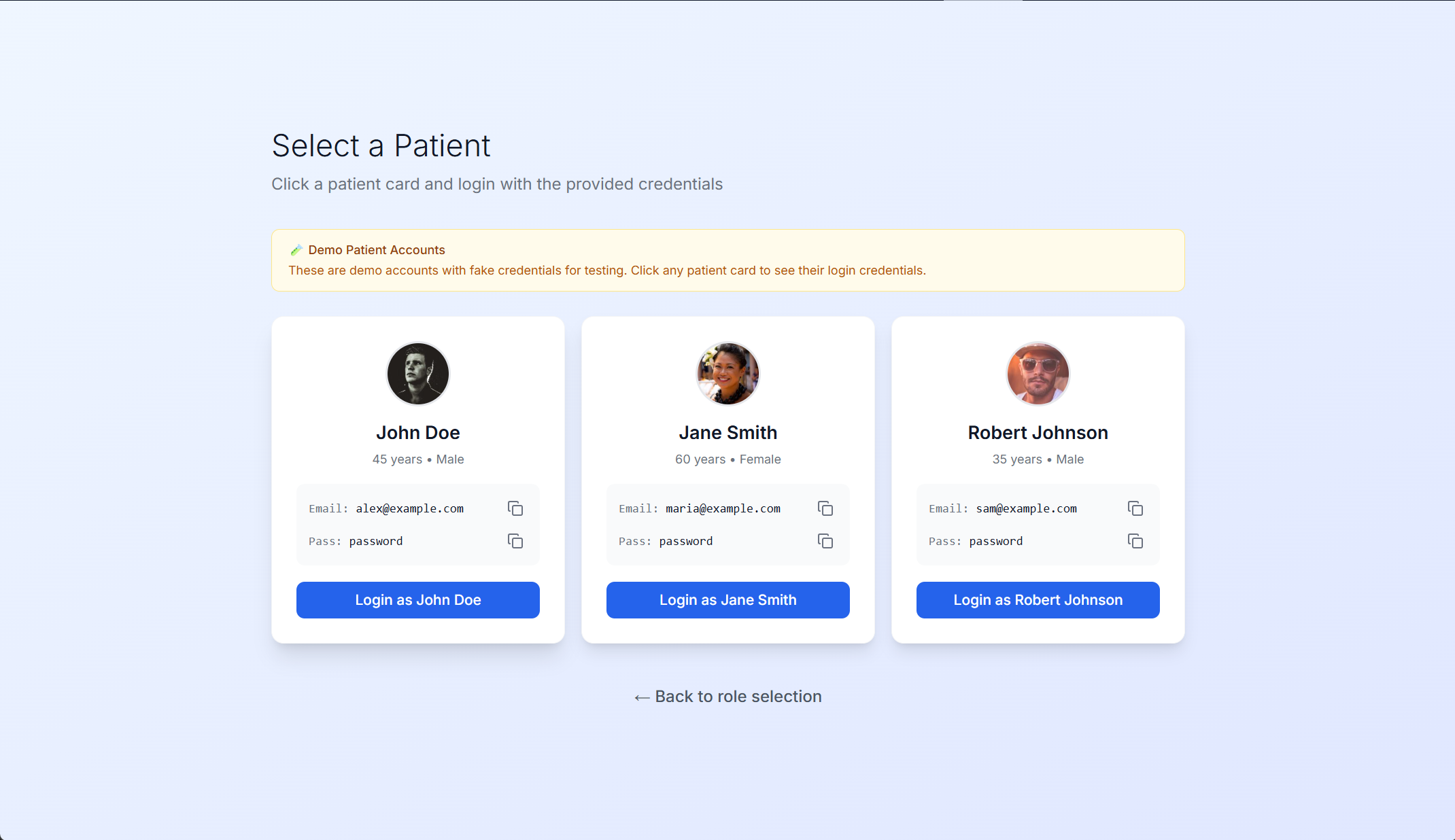
How Do I Interact with the AI Agent and System?
Simply type natural language queries in the chatbox (“Ask”) and the AI coordinator will route your request to the appropriate specialized agent.
Example Interactions With AI Agent
Details
This system is non-deterministic so results may vary.
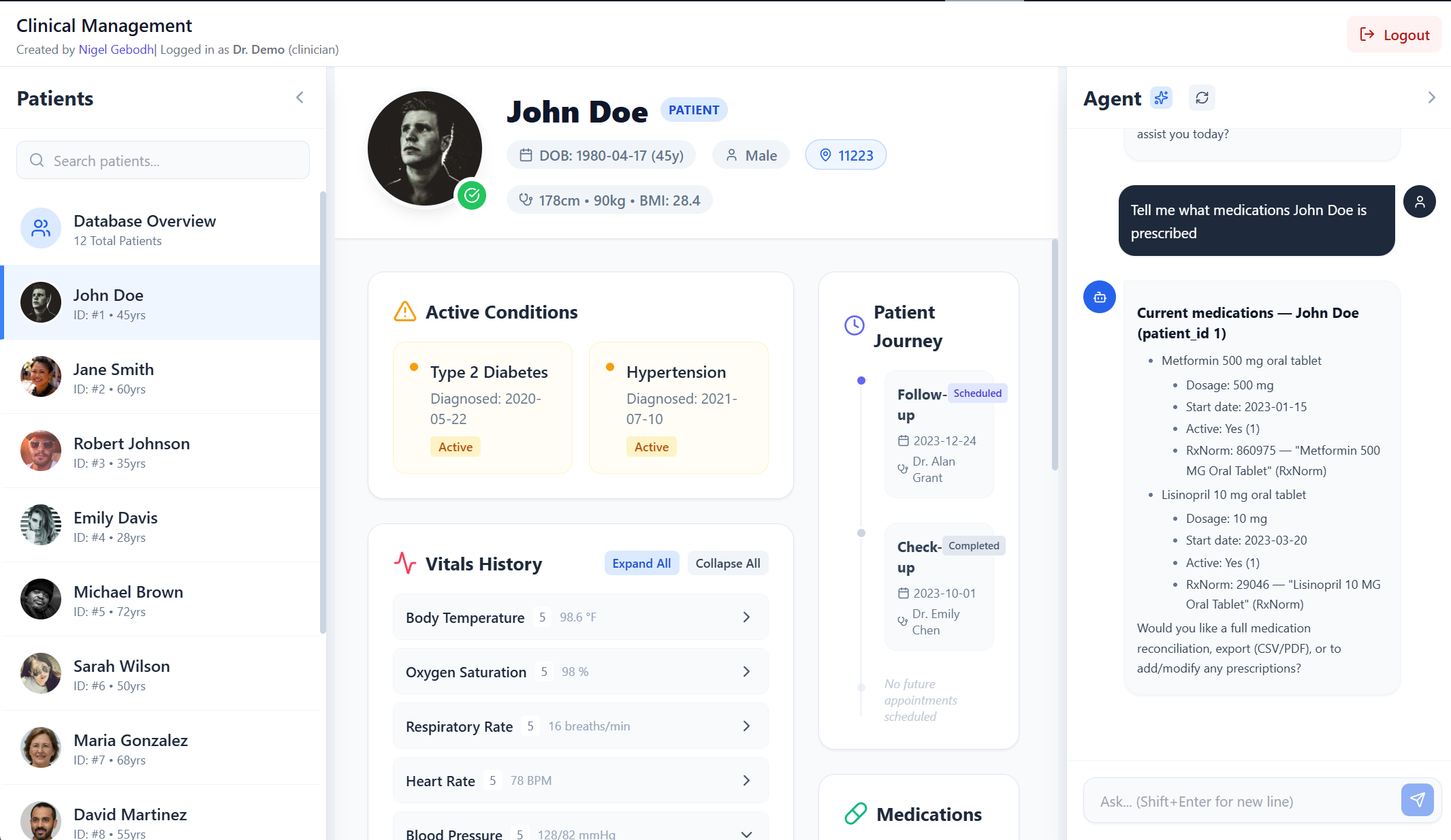
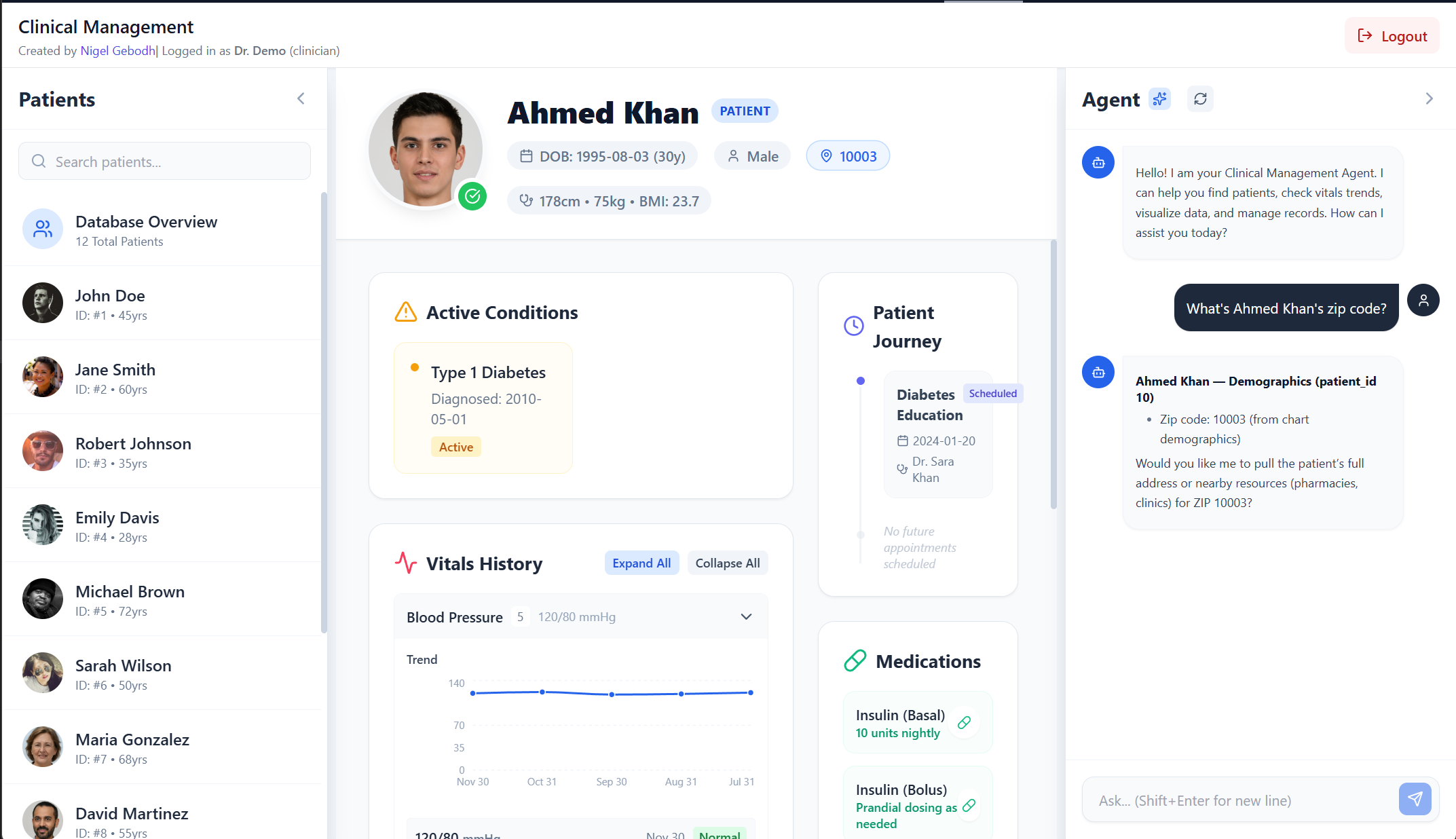
Viewing Patient Information
You: "Show me patient 1's current medications"
You: "What are John Doe's latest vital signs?"
You: "Get the medical history for patient ID 2"
You: "What's Ahmed Khan's zip code?"
You: "What pharmacies are close to Jane Smith?" (Will take some time)
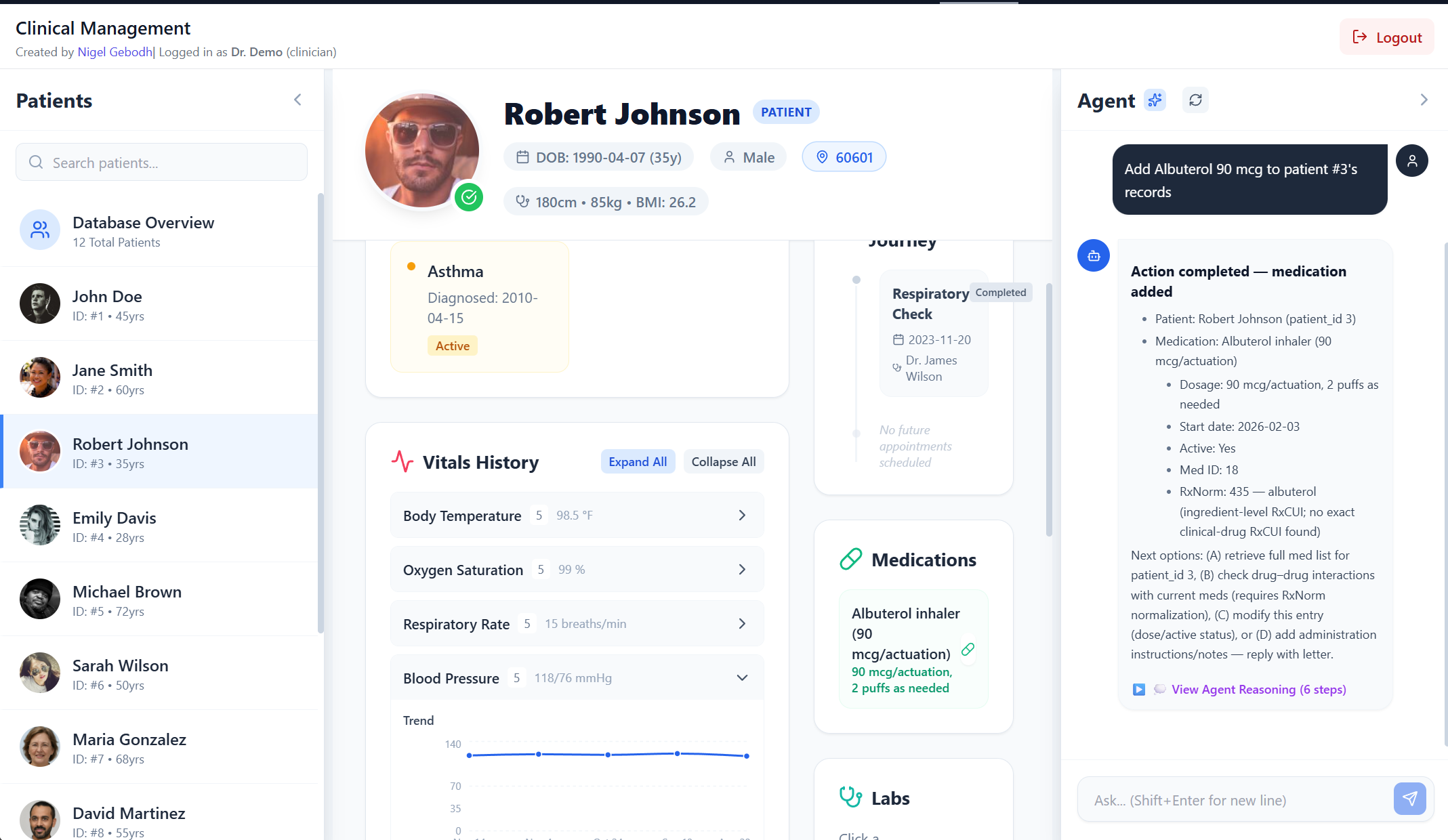
Updating Records
You: "Add a note to John Doe's visit note: Patient reports improved sleep quality"
You: "Record blood pressure of 128/82 for Jane Smith taken today"
You: "Add Albuterol 90 mcg to patient #3's records"
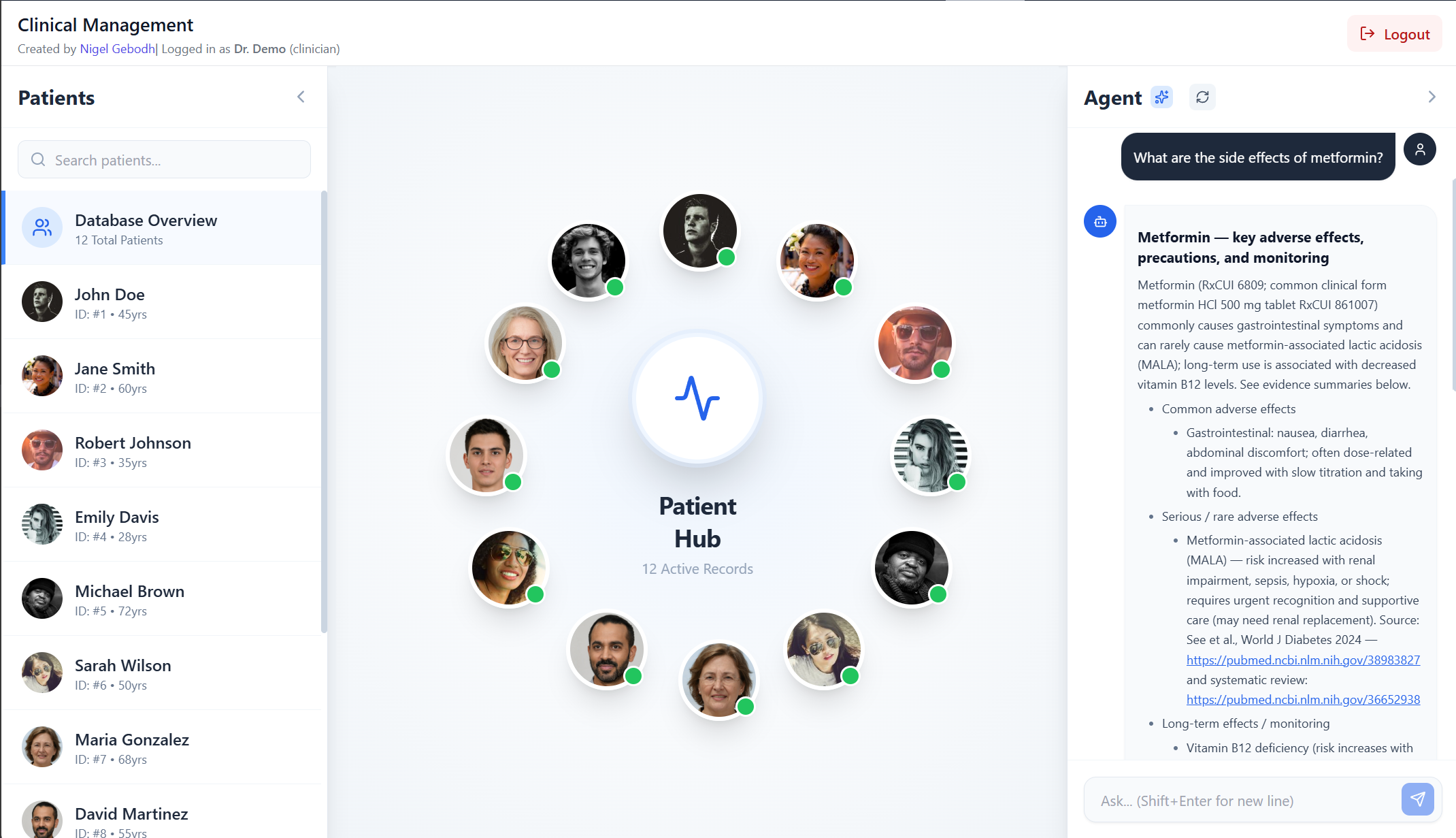
Drug Information Queries
You: "What are the side effects of metformin?"
You: "Tell me about drug interactions with warfarin"
You: "Is aspirin safe to take consistently two weeks?"
Creating Visualizations
You: "Plot patient 1's blood pressure readings over time"
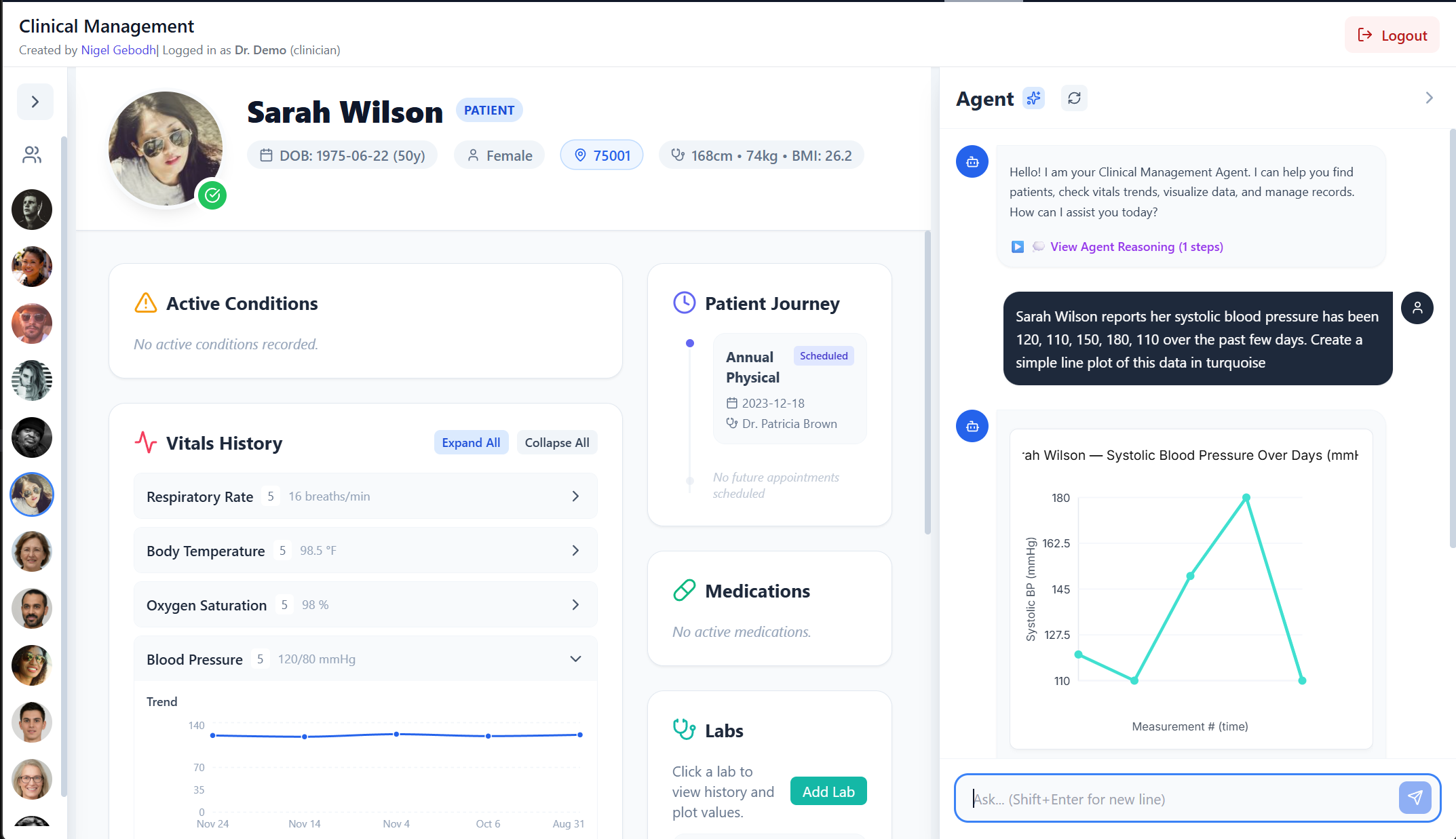
You: "Sarah Wilson reports her systolic blood pressure has been 120, 110, 150, 180, 110 over the past few days. Create a simple line plot of this data in turquoise"
You: "Show me a scatter plot of heart rate vs blood pressure for John Doe"
Medical Knowledge Searches
These will take some time too look up and refine
You: "What are the latest guidelines for Type 2 diabetes management?"
You: "Find recent trials for heart failure treatment"
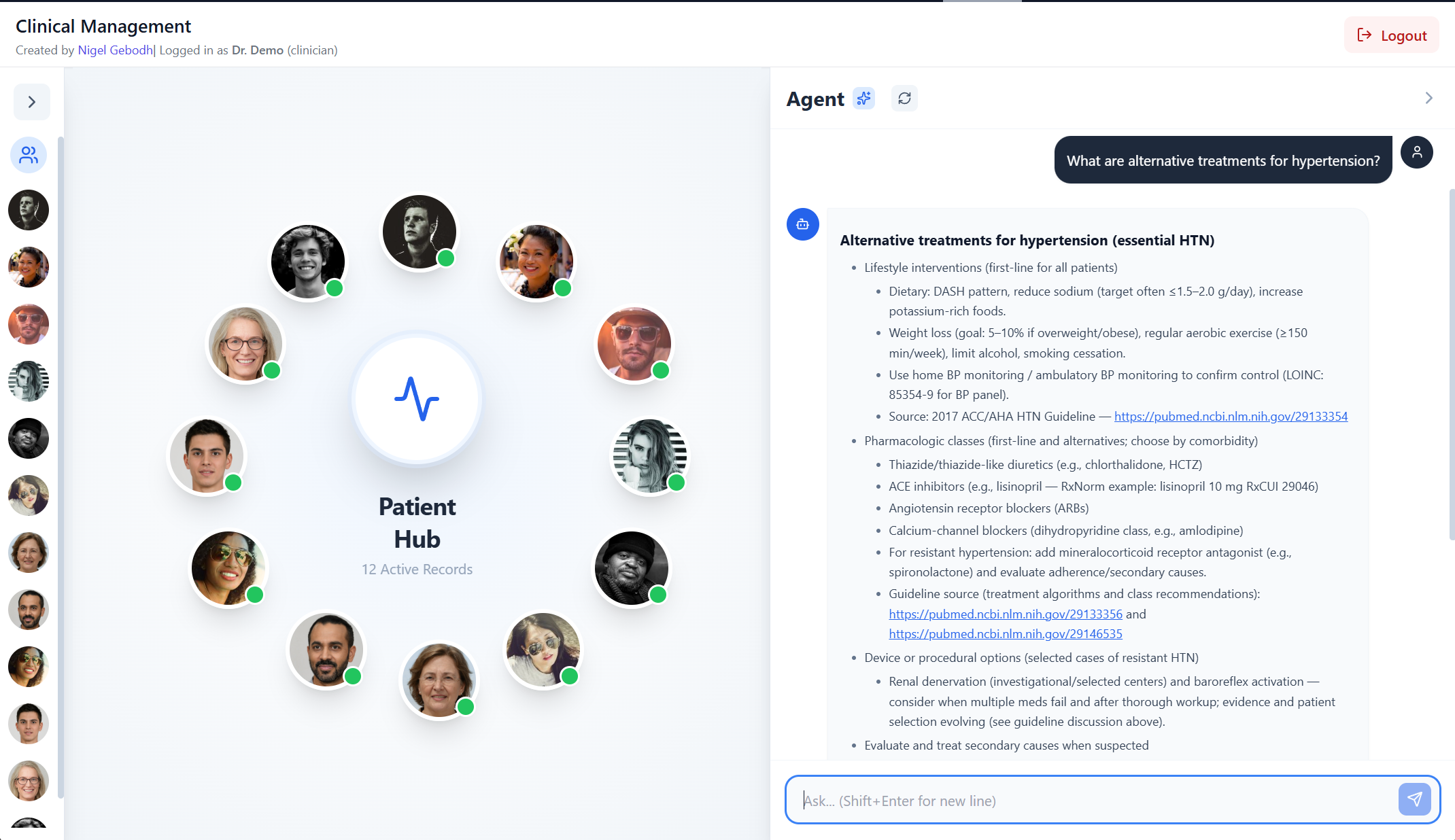
You: "What are alternative treatments for hypertension?"
What Can the Clinical Agent Dashboard Do?
How Does Natural Language Database Querying Work?
Query and update patient information using everyday language—no SQL knowledge required. The system understands requests like:
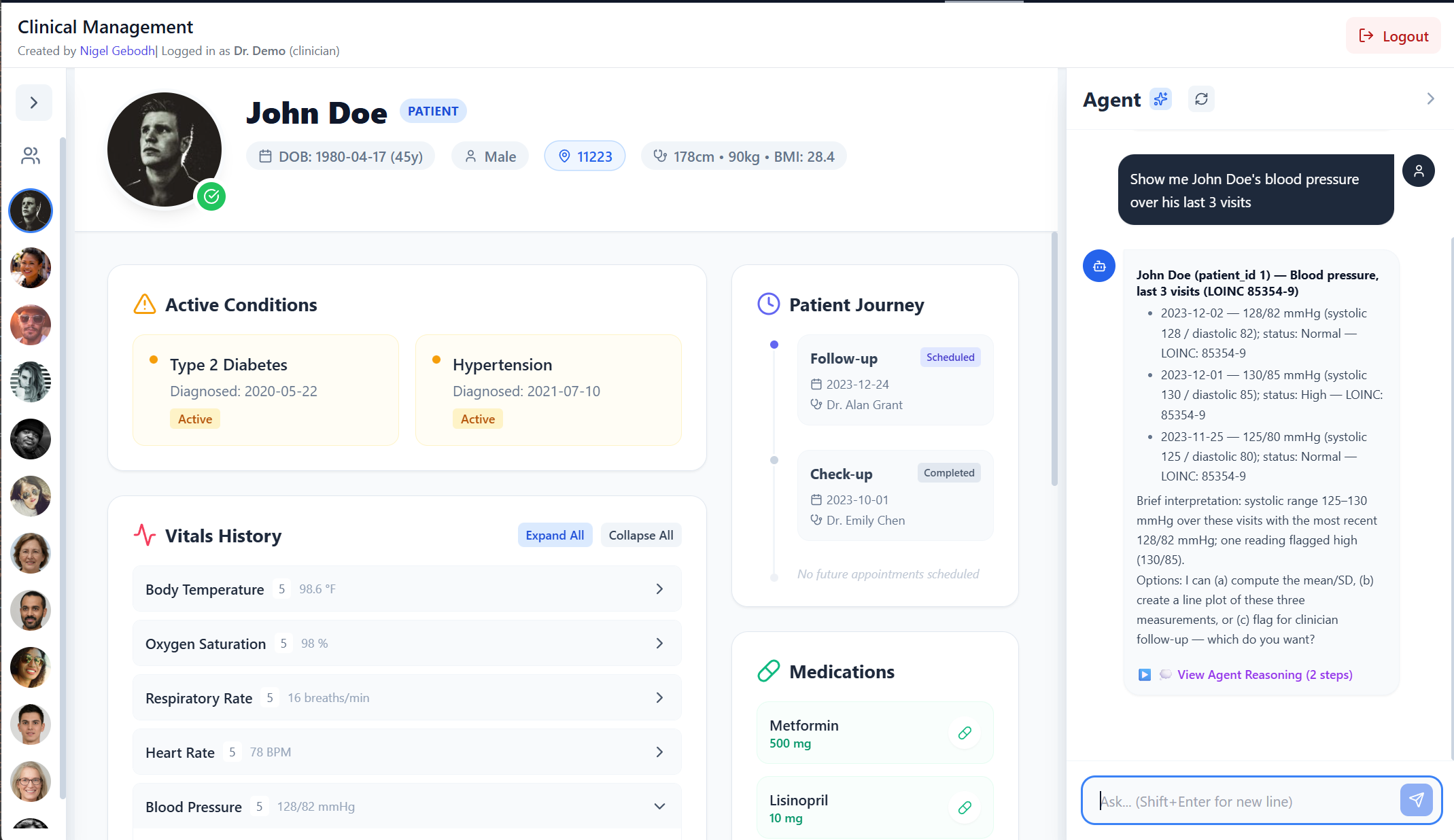
- “Show me John Doe’s blood pressure over his last 3 visits”
- “Add 200 mg of ibuprofen to Jane Smith’s current medication”
It translates them into secure, parameterized database operations and updates the patients’ records
What is Multi-Agent Architecture and Why Use It?
Multi-agent systems divide complex tasks among specialized AI agents, each with focused expertise. This approach improves accuracy, enables parallel processing when needed, and makes the system more maintainable and extensible.
Behind the scenes, a coordinator agent (router) intelligently analyzes your request and routes it to the appropriate specialized sub-agent or tools:
- Patient Database Agent - Retrieves and updates patient records, medications, vitals
- FHIR Clinical Context Agent - Builds structured clinical summaries with medical coding standards (SNOMED CT, LOINC, RxNorm)
- Drug Information Agent - Searches FDA databases for medication details, safety alerts, and interactions
- Clinical Calculation Agent - Performs medical calculations (dosing, BMI, risk scores, date arithmetic)
- Medical Search Agent - Retrieves current medical literature and clinical guidelines
- Visualization Agent - Generates interactive charts and plots from patient data
- Web Search Agent - Searches the internet for supporting patient information (pharmacy locations etc.)
This modular design means new agents can be added without disrupting existing functionality, making the system highly adaptable to evolving clinical needs.
Can I Create Data Visualizations Without Coding?
Yes (albiet simple ones)! Create meaningful visualizations instantly using natural language:
- “Plot Jane Smith’s last 3 systolic blood pressure reeadings”
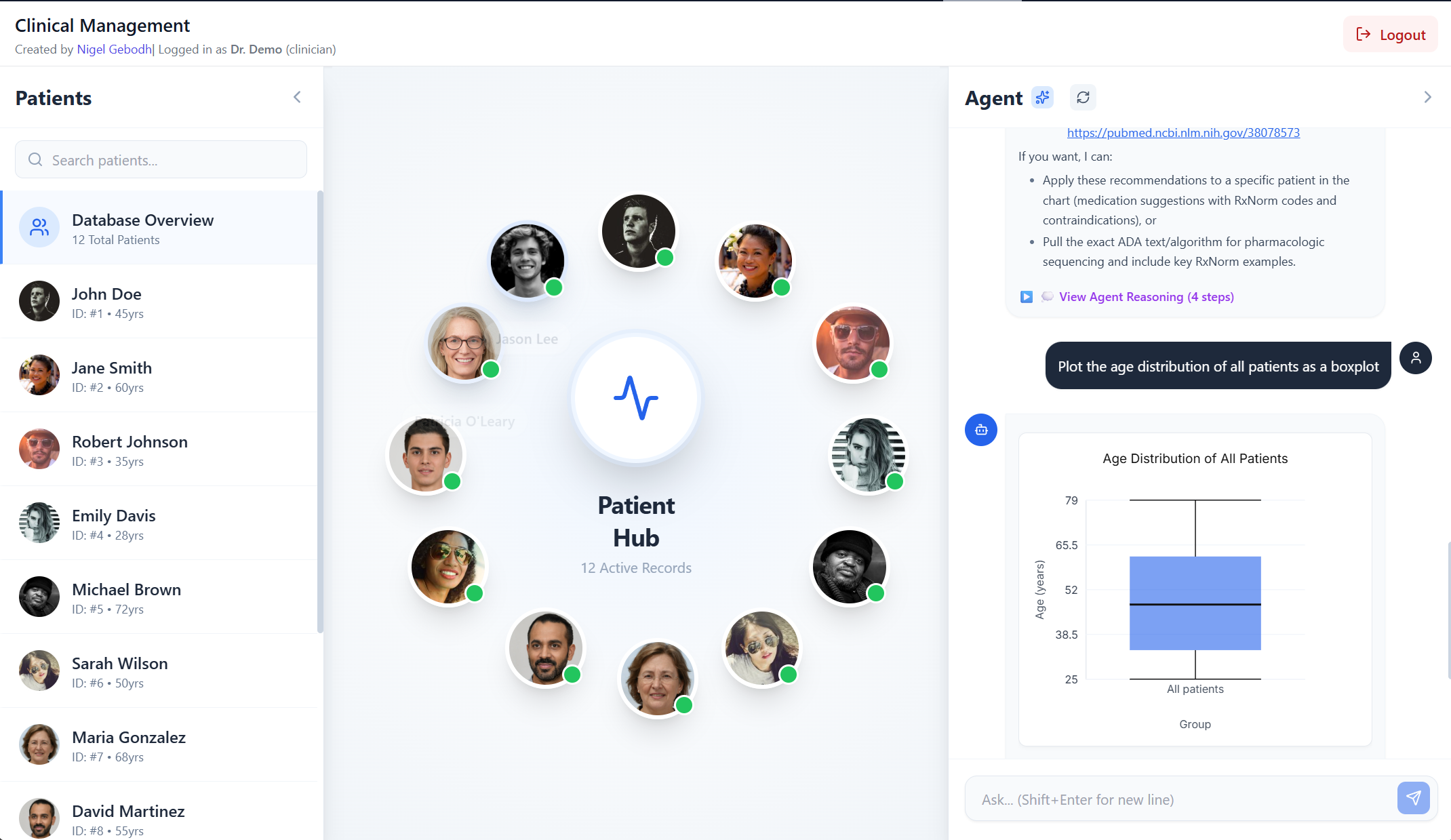
- “Plot the age distribution of all patients as a boxplot”
The visualization agent/tools generates SVG charts automatically.
Example Plot
How is Patient Data Kept Secure?
The system implements multiple security layers:
- JWT-based authentication (JSON Web Tokens) for stateless, secure sessions
- Role-based access control with separate permissions for clinicians and patients
- Parameterized SQL queries to prevent injection attacks
- CORS protection to prevent unauthorized cross-origin requests
- Production Container Hardening with multi-stage Docker build and runs via Gunicorn+Uvicorn for a reproducible, production-grade runtime
What Database Systems Are Supported?
The platform connects to standard SQL databases containing patient information. It can integrate with existing healthcare databases or operate with its built-in SQLite storage. The natural language interface works across any SQL backend.
How Does the Agent Routing Work?
The application follows an intelligent router-agent architecture, a design pattern commonly used in enterprise AI systems:
Key Points:
- Your query goes to the Coordinator Agent first
- The coordinator analyzes your intent and selects the appropriate specialist or tool
- The specialist or tool performs the task and returns results
- Responses stream back to you in real-time
- Multiple agents can work together on complex requests
What Technologies Power This System?
The Clinical Agent Dashboard is built with number of technologies optimized for AI applications:
Frontend Stack
- React - Component-based UI framework for building interactive interfaces
- TypeScript - Type-safe JavaScript for catching errors at compile time
- Vite - Frontend build tooling with lightning-fast HMR
Backend & Agent Framework
- FastAPI - High-performance Python web framework with automatic API documentation
- Google ADK (Agent Development Kit) - Multi-agent orchestration framework for building complex AI workflows
- Gunicorn + Uvicorn - Production-grade ASGI server with worker processes
What is LiteLLM and How Does Multi-LLM Support Work?
LiteLLM is a unified interface that provides a consistent API across 100+ LLM providers. This means you can:
- Switch between models without changing code
- Route different query types to different models (cost optimization)
- Use specialized models for specific medical tasks
- Avoid vendor lock-in
Supported providers include:
- OpenAI (GPT-4, GPT-4-turbo, GPT-3.5)
- Anthropic Claude (Opus, Sonnet, Haiku)
- Google Gemini (Pro, Flash)
- Meta Llama models (via various providers)
- Groq (ultra-fast inference)
- Mistral AI, Cohere, and many more
This flexibility is crucial for dynamic applications where different models may excel at different clinical tasks.
Data & Storage
- SQLite - Embedded SQL database for edge deployment
- FHIR Standards - Healthcare interoperability protocols (HL7 FHIR R4)
- Pandas - Data manipulation and analysis library
- NumPy - Numerical computing for calculations and statistics
Visualization
- SVG (Scalable Vector Graphics) - Resolution-independent vector output
Security & Authentication
- JWT (JSON Web Tokens) - Stateless authentication standard
- Parameterized SQL - Prevents SQL injection via prepared statements
- CORS - Cross-origin resource sharing protection
How Do You Monitor and Evaluate AI Agent Performance?
Observability:
- Langfuse - Open-source LLM observability platform for tracing, monitoring, and debugging agent workflows
- Tracks token usage, latency, and costs across all LLM calls
- Visualizes multi-agent conversation flows
- Enables prompt versioning and A/B testing
- MLflow - Open-source platform for managing the ML lifecycle, including experimentation and model monitoring
- Note: Observability tools can be deployed internally (self-hosted Langfuse or MLflow instances) to keep all data within your institution or organization, ensuring complete data sovereignty and compliance with internal policies
LLM Evaluation:
- RAGAS - Framework for Retrieval-Augmented Generation Assessment
- Evaluates faithfulness, answer relevance, and context precision
- Provides metrics for RAG pipeline quality
- Can be integrated with Langfuse for continuous evaluation
These tools enable data-driven optimization of agent performance, cost management, and quality assurance for AI systems.
How Extensible is the Platform?
The platform is built for easy expansion and customization:
Can New AI Agents be Added?
Yes! New specialist agents can be added to handle additional clinical workflows:
- Radiology image analysis - Integrate with vision models for X-ray/MRI interpretation
- Lab result interpretation - Automated flagging of abnormal values with clinical context
- Insurance verification - Pre-authorization and coverage checking
- Appointment scheduling - Intelligent calendar management with constraint optimization
- Clinical trial matching - Patient-to-trial matching based on eligibility criteria
Each agent can be developed and tested independently, then registered with the coordinator agent.
What Are Agent Tools and How Do They Work?
Agent tools are functions that agents can invoke to perform specific actions. Each agent can be equipped with custom tools:
- External API integrations (FDA, PubMed, HL7 FHIR servers)
- Custom calculation formulas (clinical scores, risk assessments)
- Specialized data transformations (HL7 message parsing, DICOM processing)
- Third-party service connections (labs, pharmacies, insurance providers)
Tools follow a standard interface, making them composable and reusable across multiple agents.
How Does Multi-LLM Routing Improve Performance?
With LiteLLM integration, you can implement intelligent model routing:
- Cost optimization - Use smaller models (GPT-3.5, Gemini Flash) for simple queries
- Task specialization - Route medical reasoning to advanced medically fine-tuned models
- Latency management - Use ultra-fast inference providers for time-sensitive requests
- Fallback strategies - Automatically retry with alternative models if primary fails
- Provider diversity - Avoid single-vendor dependency
This architecture enables ~6-10x cost reduction while maintaining quality on complex clinical queries.
Can I integrate this with my existing patient database?
Yes. The system is designed to connect to external SQL databases (PostgreSQL, MySQL, SQL Server) with appropriate configuration. The natural language interface adapts to various database schema automatically.
Can patients update their own information?
Patient users can view their data and add personal notes/measurements (vitals, symptoms) which will be seen by the clinicians. Administrative changes (medications, diagnoses) require clinician-level access.
What if the AI gives incorrect medical information?
This is a demonstration of the workflow’s capabilities. Always verify AI-generated clinical information and exercise judgment. The system is a clinical decision support tool, not a replacement for medical expertise. All outputs should be reviewed before clinical application.
Is this HIPAA compliant?
The application implements security best practices aligned with HIPAA technical safeguards. Full HIPAA compliance requires additional infrastructure considerations depending on deployment:
- Encryption at rest (database-level encryption)
- Comprehensive audit logging (user actions, data access)
- Business Associate Agreements (BAAs) with LLM providers
- Physical security controls (if self-hosted)
Azure OpenAI, AWS Bedrock, and other enterprise LLM providers offer HIPAA-compliant deployments with BAAs.
How can I evaluate and improve AI agent performance?
Use observability and evaluation frameworks:
- Langfuse - Track all agent interactions, measure latency and costs
- RAGAS - Evaluate response quality (faithfulness, relevance)
- A/B testing - Compare different models or prompts on real queries
- User feedback loops - Collect thumbs up/down ratings from clinicians
These tools enable data-driven optimization of accuracy, cost, and user satisfaction.
What Are the Best Practices for Using This System?
Details
For Clinicians
✅ DO:
- Use patient identifiers (name or ID) for clarity
- Request specific data points when possible (“last 3 BP readings” vs “all vitals”)
- Review AI-generated summaries as the models can still make mistakes
- Use medical terminology naturally—the system understands SNOMED, LOINC codes
❌ DON’T:
- Make critical clinical decisions based solely on AI output
- Include sensitive information not relevant to the query
For Patients
✅ DO:
- Ask questions in plain language
- Request explanations of medical terms you don’t understand
- Track your own vitals and medications using the system
❌ DON’T:
- Use the system for medical emergencies—call emergency services
Important Disclaimers
- All data within the database are synthetic but represent real clinical cases
- This system is a clinical decision support tool, not a replacement for professional medical judgment
- Always verify AI-generated information with authoritative clinical sources
- For medical emergencies, contact emergency services immediately—do not use this application
- Consult healthcare providers for diagnosis, treatment decisions, and medication changes
- The system’s outputs should be reviewed by qualified clinicians before clinical application
Support & Feedback
This application represents an evolving platform for clinical decision support. I welcome feedback, and feature requests to improve the system. Reach out with any questions
- Made by Nigel Gebodh
- Email:
- LinkedIn: Nigel Gebodh